
PAYCO Sandbox Guide
This guide explains how to set up the sandbox environment for testing PAYCO digital wallet payment.
Sandbox limitations
1. PAYCO Development Account Registration
A separate account registration is required to test in the PAYCO sandbox environment.
Registration Steps
- Integrate the Hecto Financial PAYCO Checkout API.
- Click the Sign Up button in the PAYCO demo window.
- Agree to the terms and click Next.
- Complete identity verification.
- If you have a mobile phone: Complete mobile phone identity verification and proceed with registration
- If you do not have a mobile phone: Click "Don't have a mobile phone registered in your name?" and register via email
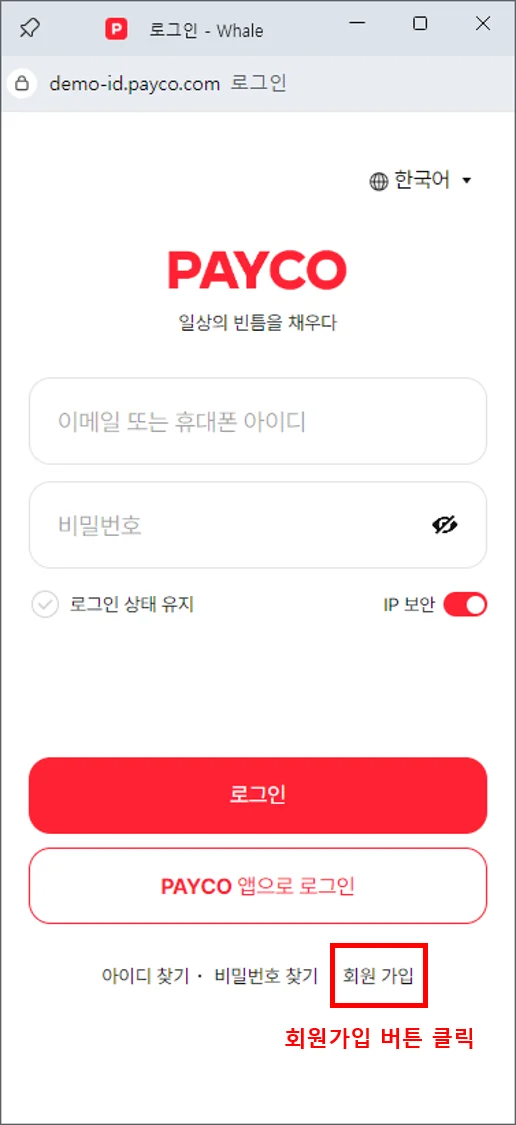
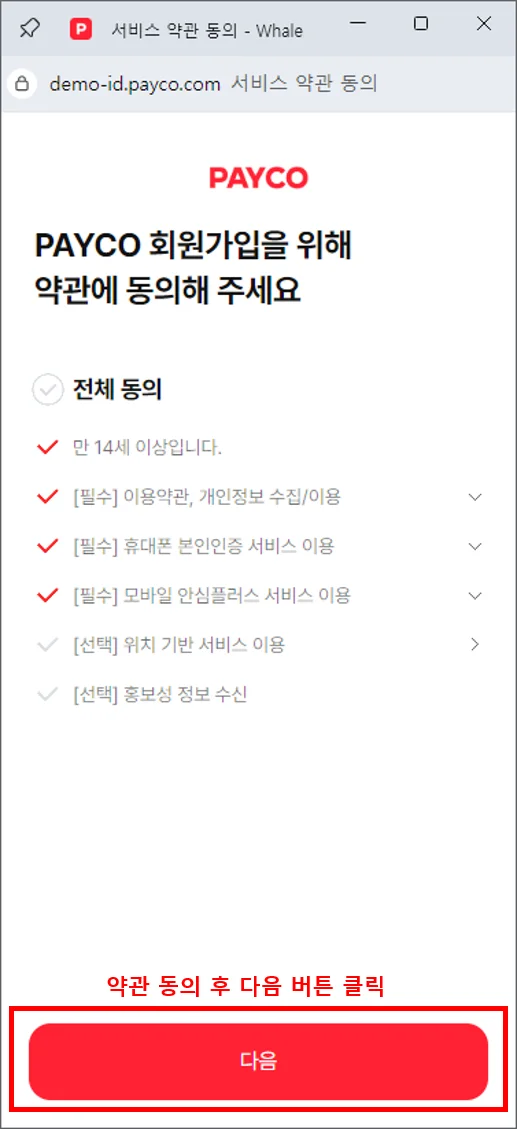
If You Do Not Have a Mobile Phone (Email Registration)
If mobile phone identity verification is not available, you can register via email.
- On the identity verification screen, click "Don't have a mobile phone registered in your name?"
- Click Register via email and complete email verification
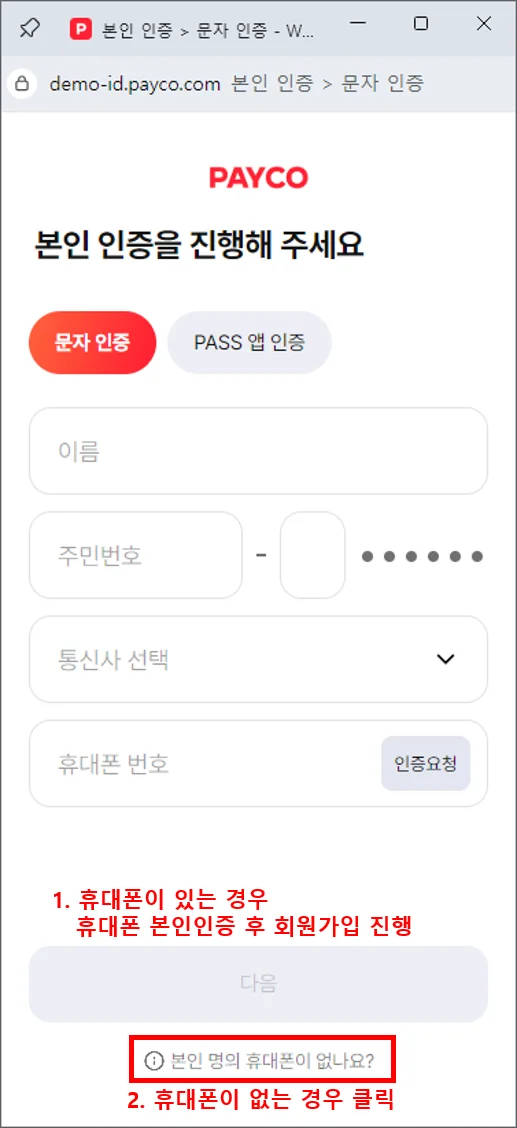
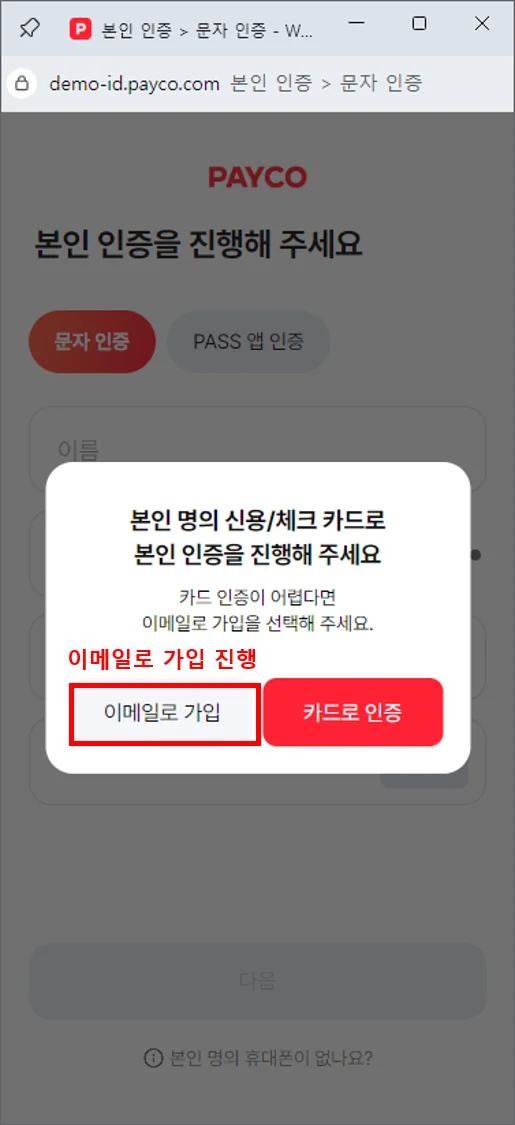
2. Test Card Information
For PAYCO sandbox point accumulation, coupon issuance, and card number details, visit the PAYCO Developer Center.
The following are test cards that can be registered in the sandbox environment. Please register multiple cards and if an error occurs, try a different card.
| Card Issuer | Card Number | Expiry | CVC | Password |
|---|---|---|---|---|
| Hana Card | 9440-81**-- | 12/25 | *** | **** |
| Hana Card | 4570-47**-- | 12/25 | *** | **** |
| Shinhan Card | 5107-3767-1104-**** | 12/25 | *** | **** |
| Shinhan Card | 9410-84**-- | 12/25 | *** | **** |
| BC Card | 4906---**** | 12/25 | *** | **** |
| BC Card | 5377-03**-- | 12/25 | *** | **** |
| Hyundai Card | 9490-1907-- | 12/25 | *** | **** |
| Hyundai Card | 3646-83**-- | 12/25 | *** | **** |
| Woori (BC) Card | 6253-20**-- | 12/25 | *** | **** |
| Woori (BC) Card | 9420-22**-- | 12/25 | *** | **** |
| Kookmin Card | 4673-09**-- | 12/25 | *** | **** |
| Kookmin Card | 4579-92**-- | 12/25 | *** | **** |
| NH Card | 4988-19**-- | 12/25 | *** | **** |
| Shinhan Card | 9710-10**-- | 12/25 | *** | **** |
| Woori Proprietary Card | 4693-69**-- | 12/25 | *** | **** |
Card number information
Sandbox notice
3. PAYCO Development App Installation
Installing the PAYCO development app is required for app integration testing.
Installation Steps
Download the test AOS/iOS app from the PAYCO Developer Center > APP Download page.
Notes for iOS Installation
iOS trust configuration required
- If the trust setting is not configured, you will see a message directing you to install the PAYCO app from the iOS App Store.
- If the existing PAYCO production app is installed, please uninstall it before installing the development app.
App Scheme Configuration
For Android and iOS app schemes, refer to the PAYCO Digital Wallet section in the WebView Integration Guide.
Next Steps
PAYCO Integration



Need technical support?
Code Samples
HectoFinancial GitHub