
Chrome 142 update: ISP payments no longer working?
How Chrome's Local Network Access (LNA) policy change affects payment systems and what to do about it

"ISP authentication payments stopped working out of nowhere"
If you operate a payment integration, you may have run into this. Since October 2025, ISP (AnsimClick) authentication payments for KB Kookmin Card, Kakao Bank Card, and BC Card have been failing in Chrome.
The cause is the Local Network Access (LNA) policy introduced in Chrome 142. Chrome now blocks local network access for security reasons.
This article explains what the LNA policy is and how it affects payment systems.
What is Local Network Access (LNA)?
Local Network Access refers to a web browser making requests to the user's local network — think routers, printers, and other devices on the same network.
Chrome started restricting this access as a security hardening measure. The goal is to prevent public websites from sending requests to the local network without the user's consent.
Why is it being blocked?
| Threat | Description |
|---|---|
| CSRF attacks | Malicious sites silently changing a user's router settings |
| Network scanning | Sites mapping the local network topology for use in attacks |
| Internal service access | Requests reaching internal services that should be inaccessible from outside |
What LNA policy covers
How does this affect payment systems?
ISP (AnsimClick) authentication works by communicating with a locally installed security program. The browser sends requests to localhost or 127.0.0.1 to complete identity verification.
Starting with Chrome 142, those requests are blocked without explicit user permission.
Affected payment methods
| Card issuer | Authentication method | Impact |
|---|---|---|
| KB Kookmin Card | ISP authentication | Blocked |
| Kakao Bank Card | ISP authentication | Blocked |
| BC Card | ISP authentication | Blocked |
Note
Rollout timeline
| Version | Release date | What changed |
|---|---|---|
| Chrome 138 | June 2025 | Testable via flag |
| Chrome 141 | September 2025 | Permission prompt introduced |
| Chrome 142 | October 28, 2025 | LNA policy fully enforced |
This also applies to Chromium-based browsers including Edge, Brave, and Opera.
How to handle it
Guide users (recommended)
When the Allow local network access prompt appears during checkout, instruct users to click "Allow."
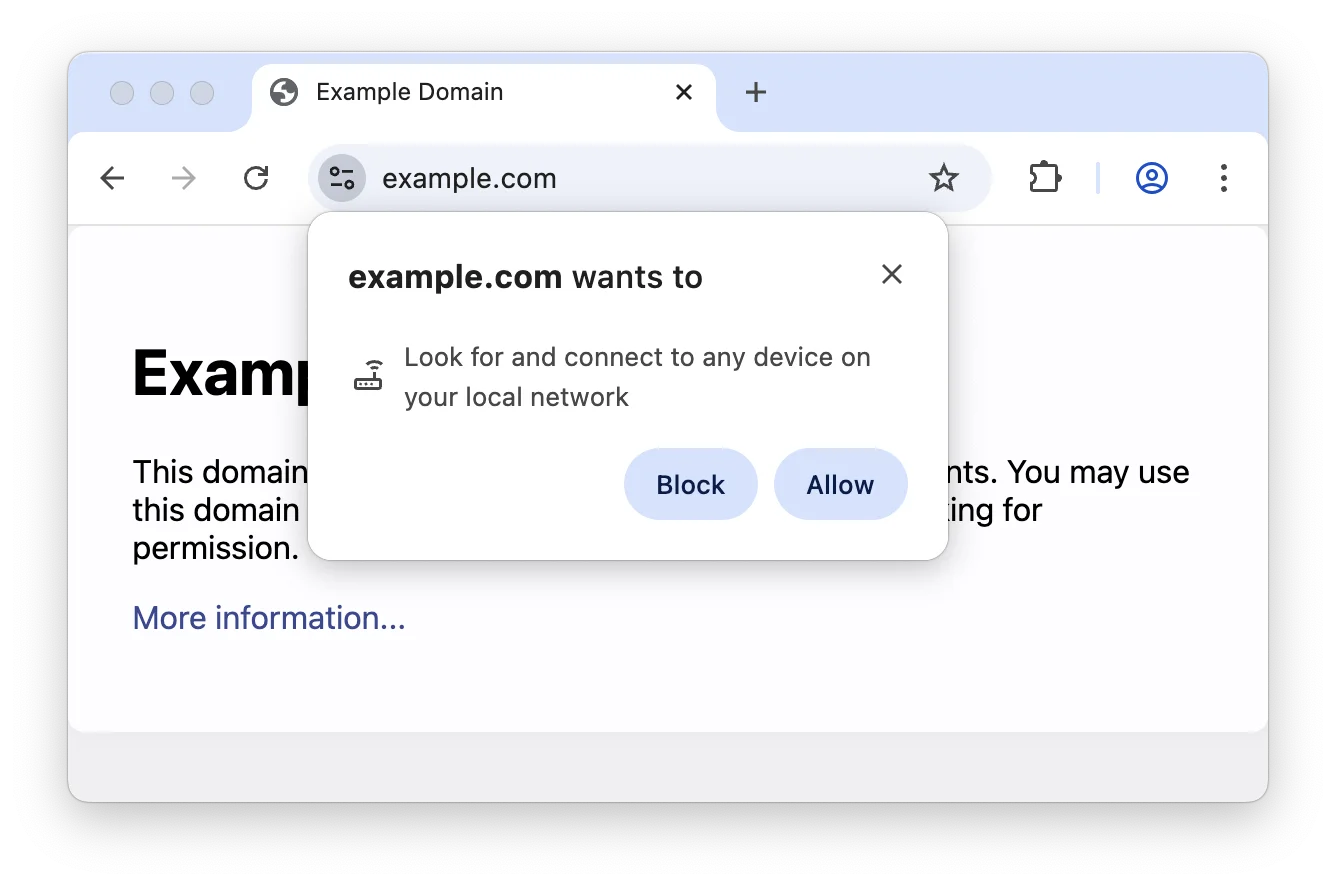
[Example guidance text for your payment page]

Using Chrome?
An "Allow local network access" prompt will appear for ISP authentication.
Please click "Allow" to proceed.
Changing browser settings manually
If a user dismissed or blocked the prompt, they can change the setting manually:
- Click the lock icon on the left side of the address bar
- Select Site settings
- Set Local network access to "Allow"
Or navigate directly in the browser:
chrome://settings/content/siteDetails?site=[your-payment-page-URL]
Offer alternative payment methods
If ISP authentication continues to fail, suggest these alternatives:
- Use a different browser (Safari, Firefox)
- Switch to mobile payment
- Choose standard card payment (MPI authentication)
Developer checklist
Setting up a test environment
You can test the LNA policy behavior on Chrome 138 or later before it goes live.
chrome://flags/#local-network-access-check
Set this flag to "Enabled (Blocked)" to simulate the LNA policy in your environment.
Setting iframe attributes
When embedding a payment window or external content in an iframe, you must explicitly include local-network-access in the allow attribute.
<iframe
  src="https://payment.example.com/checkout"
  allow="encrypted-media; local-network-access"
  allowfullscreen
  webkitallowfullscreen
  mozallowfullscreen>
</iframe>
| Attribute | Description |
|---|---|
allow="local-network-access" | Allows local network access from within the iframe |
allow="encrypted-media" | Allows DRM / protected content playback |
allowfullscreen | Allows full-screen mode |
Important
Tip
What to do now
Chrome 142's local network access policy is a security improvement, but it has real impact on services that depend on local communication, like ISP authentication.
- ISP authentication (KB Kookmin, Kakao Bank, BC Card) may be blocked in Chrome
- The fix for users is simple: click "Allow" on the permission prompt
- Developers must add
allow="local-network-access"to any iframe wrapping a payment window - Use
chrome://flagsto test the behavior in advance
Add guidance text to your payment page and audit your iframe attributes now.
Reference
- Chrome Developers - Local Network Access - Official policy documentation

Need technical support?
Code Samples
HectoFinancial GitHub